How DNS Resolution Works
Software engineer passionate about tech, innovation & research. I explore, build, and share insights on coding, systems, and emerging technologies.
What is the Problem?
When we want to visit a website, we simply type a name like google.com or amazon.com. These names are easy for humans to remember. However, computers and the internet do not work with names; they work with numbers called IP Addresses (e.g., 142.250.190.46).
The problem is that we cannot remember long strings of numbers for every website they visit, and computers cannot "talk" using words. We need a system that can translate human-friendly names into computer-friendly numbers.
Solution: DNS
DNS (Domain Name System) converts domain names into IP addresses.
It allows computers to find the correct server when a website name is entered.
Without DNS, users would need to remember IP addresses for every website.
What is the dig Command?
dig (Domain Information Groper) is a command-line tool used to query DNS servers.
It is used to:
Debug DNS issues
Check name servers
Understand DNS resolution step by step
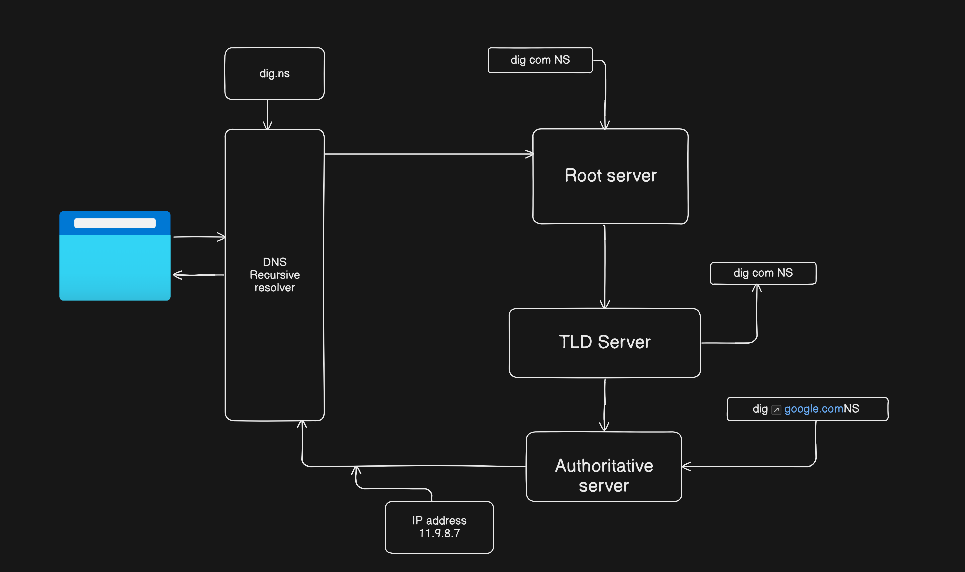
Understanding dig . NS and Root Name Servers
dig . NS
The dot . represents the DNS root and root servers are the top of the DNS hierarchy it only know where TLD servers .com, .in are
Understanding dig com NS and TLD Name Servers
dig com NS
Shows name servers responsible for .com then these servers know where authoritative servers for domains are because it do not store IP addresses of websites
Understanding dig google.com NS and Authoritative Servers
dig google.com NS
it returns authoritative name servers for google.com these servers store actual DNS records like IP addresses
Understanding dig google.com and Full DNS Flow
dig google.com
DNS resolution flow:
Resolver queries root server
Root returns
.comTLD serversTLD returns authoritative servers
Authoritative server returns IP address
IP is sent back to the client
NS Records and Recursive Resolvers
NS records define which servers control a domain
Recursive resolvers (ISP / Google DNS):
Query root, TLD, and authoritative servers
Cache results for faster future access


