DNS Record Types Explained

Software engineer passionate about tech, innovation & research. I explore, build, and share insights on coding, systems, and emerging technologies.
I spent the some time to lean DNS (Domain Name System), and it is honestly like the secret GPS of the internet. Here is a what I learned,
The Problem
Computers are great with numbers. Every server on the internet has a specific IP Address (like 192.168.1.1 or a long IPv6 string). If you wanted to visit Google, you technically could type their IP into the browser.
But humans are terrible at this. We remember names like google.com or github.com or my website rochaktiwari.online (promotion is necessary, go and cheak out my website after reading this blog). The problem is: how does the computer know which IP belongs to which name?
The Solution is DNS Records
DNS is essentially the "Phonebook of the Internet." When you type a URL, your browser asks a DNS server, Where should this request go?, The server looks at its records to find the answer. These records are just small pieces of data that tell the internet how to handle your domain.
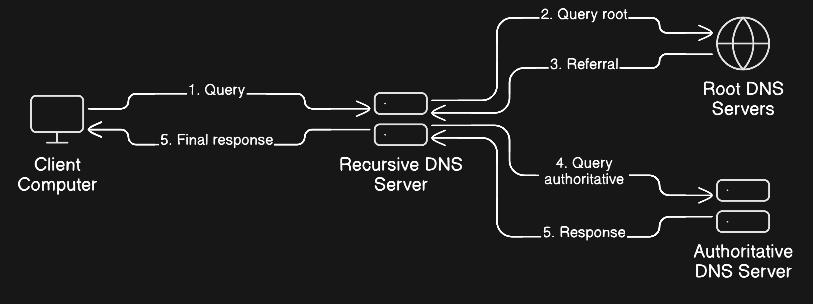
SO the Implementations of Common DNS Records is like
1. A Record (The Address)
This is the most fundamental record. The A stands for Address. It maps a domain name directly to an IPv4 address.
Purpose: To tell the browser exactly which server (IP) to go to.
Real-World Example: You point yourportfolio.com to your server's IP 123.45.67.89.
2. CNAME Record (The Alias)
CNAME stands for Canonical Name. Think of this as a nickname or an alias. Instead of pointing a name to an IP, it points a name to another name.
Purpose: To point multiple subdomains to one main domain without needing a new IP for each.
Real-World Example: You want
www.mysite.comto just point tomysite.com. If the IP ofmysite.comchanges,wwwfollows it automatically because it’s just an alias.
3. AAAA Record (The IPv6 Address)
This is just the A Record for the modern age.
Purpose: It maps a domain name to an IPv6 address (the much longer, newer IP format).
Real-world Example: As the world runs out of old IPv4 addresses, you use AAAA records to point to servers using the new format.
4. CNAME Record (The Nickname)
CNAME stands for Canonical Name. Instead of pointing a name to a number (IP), it points a name to another name.
Purpose: To create aliases. It’s useful if you want multiple names to lead to the same place without managing multiple IPs.
Real-world Example: You want
www.mysite.comandblog.mysite.comto both just go tomysite.com. If the IP ofmysite.comchanges, the others follow it automatically.
4. MX Record (The Mailman)
MX stands for Mail Exchanger. This record tells the internet where to send emails.
Purpose: It directs email traffic to the specific mail servers (like Google Workspace or Outlook) that handle your domain's inbox.
Real-World Example: When someone emails
me@google.com, the internet looks at the MX record to see that the mail should be delivered tomail.google.com.
5. NS Record (The Boss)
NS stands for Name Server. These records tell the rest of the internet which DNS provider is in charge of your domain.
Purpose: Delegation. It says, "If you want to know the A or MX records for this domain, go ask these specific servers."
Real-World Example: If you buy a domain on GoDaddy but want to manage it on Cloudflare, you update the NS records to point to Cloudflare.
6. TXT Record (The Sticky Note)
The TXT record is a flexible Text record that holds whatever info you need to provide to external systems.
Purpose: Mostly used for verification and security. It proves you own the domain and tells other mail servers that your emails aren't spam (using things like SPF or DKIM).
Real-world Example: Google says, "To prove you own this site, add this random code
google-site-verification=12345to your DNS." You drop that into a TXT record.
Common Confusion Points
A Record vs. CNAME
A Record maps to an IP (Physical address).
CNAME maps to a Name (Nickname).
note: Most experts recommend using an A record for your root domain (e.g.,
site.com) and CNAMEs for subdomains (e.g.,blog.site.com).
NS vs MX
NS controls everything regarding the domain's settings.
MX only controls email.
Changing the NS records is a "big move" (it migrates your whole setup), while changing MX records just changes who hosts your email.
DNS is just like set of instructions telling traffic exactly where to go.
This is what i think so.


